

Foil stamping printing is becoming a preferred finishing solution in packaging, stationery, and custom branding. With UV digital cold foil technology, brands can apply metallic highlights without metal plates, long setup time, or high costs. The process offers clean production, stable quality, and high precision. It also allows customization for small batches, personal branding, logo enhancement, and even specialty work such as 3d print a stamp, paw print ink stamp, 3d print leather stamp, and 3d printed leather stamps for craft studios and niche product designers.
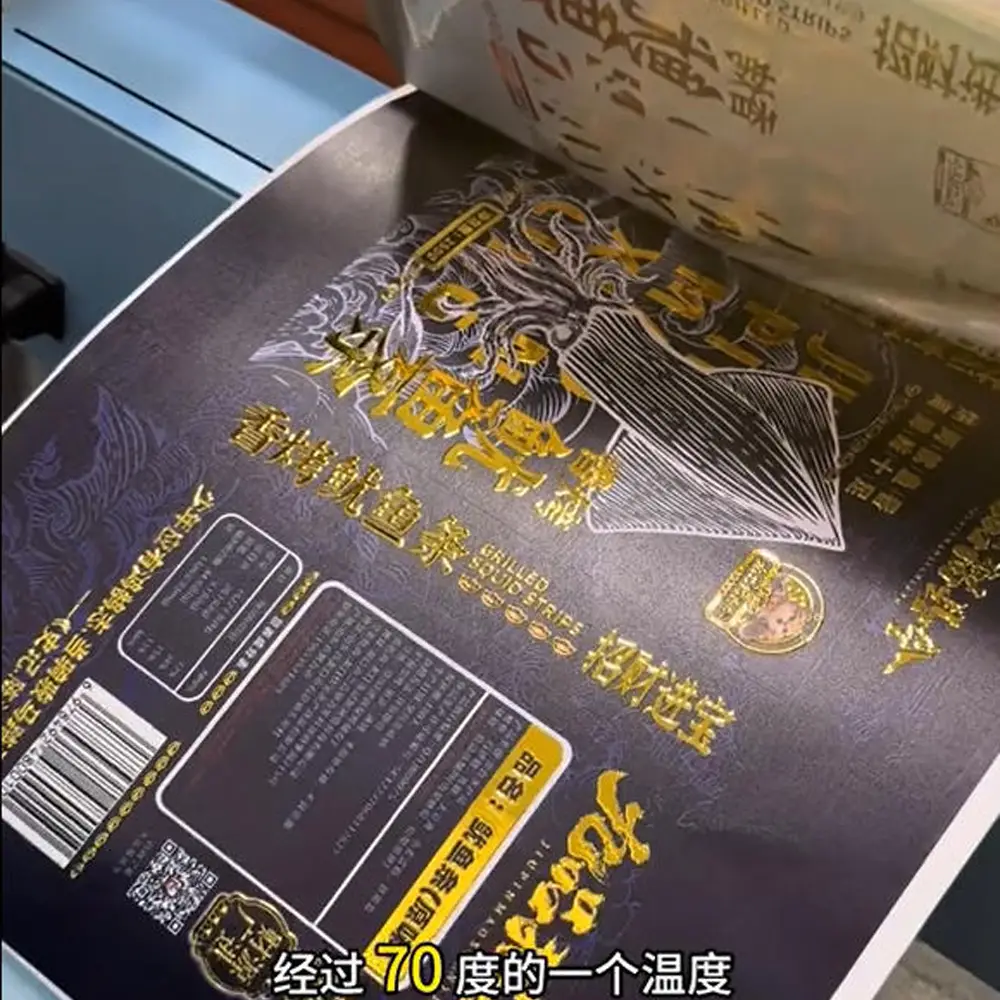
What Makes UV Digital Cold Foil Different
Traditional foil stamping uses heat and pressure with metal plates.
UV digital cold foil uses printed adhesive varnish instead.
Core principle:
- Print foil varnish only on the selected areas with a UV printer.
- Laminate the foil film at ~70°C using a laminator.
- Peel off the film and the metallic layer stays only on the varnish areas.
In short: Print adhesive → Laminate → Peel → Get precise foil stamping.
Where Foil Stamping Printing Is Commonly Used
| Industry | Application Examples | Impact |
|---|---|---|
| Premium Liquor & Beverage | Whiskey boxes, wine labels, brand emblems | Luxury branding and identity |
| Beauty & Cosmetics | Lipstick boxes, perfume packaging, skincare gift sets | Stylish, high-end visual appeal |
| Tea & Gift Products | Celebration gift boxes, chocolate boxes, seasonal packaging | Elegant, festive, premium atmosphere |
| Books & Stationery | Hardcover covers, certificate covers, journals | Refined and polished presentation |
| Invitations & Greeting Cards | Wedding invitations, business cards, celebration cards | Formal, meaningful visual expression |
What You Need
| Item | Notes |
|---|---|
| UV Flatbed Printer | Must be UV curing capable |
| White / CMYK Ink (optional) | Used for underlayers on dark materials |
| Digital Cold Foil Varnish | Special adhesive varnish for foil transfer |
| Digital Cold Foil Film (PET) | Must match the varnish formulation |
| Laminator / Roll Press | Manual or automatic |
Step-by-Step Workflow
1. File Preparation
- Create design in Illustrator or Photoshop.
- Set foil areas as a spot color channel (e.g., named “FOIL”).
2. Print Underlay (Optional)
- Use white or full-color print as the base.
- Ensure complete UV curing.
3. Apply Foil Film
- Laminator temperature: ~70°C
- Metallic layer faces downward.
- Keep film flat and free of bubbles.
4. Print Foil Varnish
- Output only the foil (spot color) layer with varnish ink.
- Turn off CMYK channels for this stage.
5. Laminate and Peel
- Apply pressure and roll.
- Cool briefly.
- Peel smoothly and evenly.
Result:
Metallic foil transfers only to printed varnish areas, clean edges, no haze, sharp lines.
Advantages of UV Digital Foil
- High precision for fine lines, small text, intricate logos
- No powder, clean operation, eco-friendly
- Fast production, ideal for short runs and on-demand customization
- Brilliant metallic texture and strong adhesion
- Works on many materials: paper, acrylic, leather, plastic, wood
Common Issues and Solutions
| Issue | Cause | Solution |
|---|---|---|
| Foil not fully transferred | Varnish too thin / pressure too low | Increase varnish volume, pressure, or peel angle |
| Film and varnish not compatible | Material mismatch | Always use tested compatible foil and varnish |
Summarize
UV digital cold foil combines digital flexibility with luxurious metallic finishing. To achieve stable, high-quality foil stamping printing results:
- Use matched foil + varnish
- Control foil varnish thickness
- Practice consistent lamination and peeling techniques
With the right parameters, producers can deliver fast, premium-quality foil effects suitable for packaging brands, craft studios, and personalization businesses—whether printing foil stamp printing for packaging or producing specialty items like 3d printed leather stamps for boutique makers.