

6090 UV printer maintenance is essential for preventing nozzle clogging, ink break issues, guide rail wear, UV lamp overheating, and unstable printing. This guide is written for print shops and production teams using 6090 UV flatbed printers for daily or frequent custom printing work. It explains practical maintenance checks for consumable parts, capping station cleaning, guide rail lubrication, cooling liquid replacement, and regular inspection routines.
1. Early Warning Signs: Color Missing and Ink Break Issues
If you notice missing colors, broken lines, or uneven output during printing or test strips, first check the consumable parts of the ink system.
These parts wear with use and must be replaced on schedule to maintain smooth ink flow.
Key Consumables (Recommended Replacement Cycle: Every 6–12 Months)
- Dampers
The internal filter gradually accumulates ink residue and dust, reducing ink flow.
Replacing dampers ensures stable ink delivery to the print head. - Ink Pump
The pump generates suction during cleaning.
Weak pump pressure leads to incomplete cleaning and poor waste ink discharge, which can cause nozzle clogging. - Wiper Blade
The blade wipes the print head surface during cleaning.
If damaged or aged, it causes poor cleaning and ink mixing.
Clean with UV cleaning solution only. Do not use water. - Capping Pad
Located under the capping station, it absorbs waste ink.
When saturated, waste ink may overflow or backflow, contaminating the print head.
Action Plan:
Do not wait until clogs appear.
Replace consumables every 6–12 months based on usage — this prevents 80% of print quality issues.
2. Foundation of Daily Stability: Guide Rail Maintenance
How to Maintain
- Clean dust and ink residue on the guide rail using a lint-free cloth.
- Apply a thin layer of UV printer solid grease.
Why It Matters
The guide rail supports the print head carriage.
Smooth motion prevents vibration, misalignment, and ghosting.
Regular lubrication protects print accuracy and reduces wear.
3. Deep Maintenance: Capping Station and Sensors
1) Capping Station—The Print Head “Home”
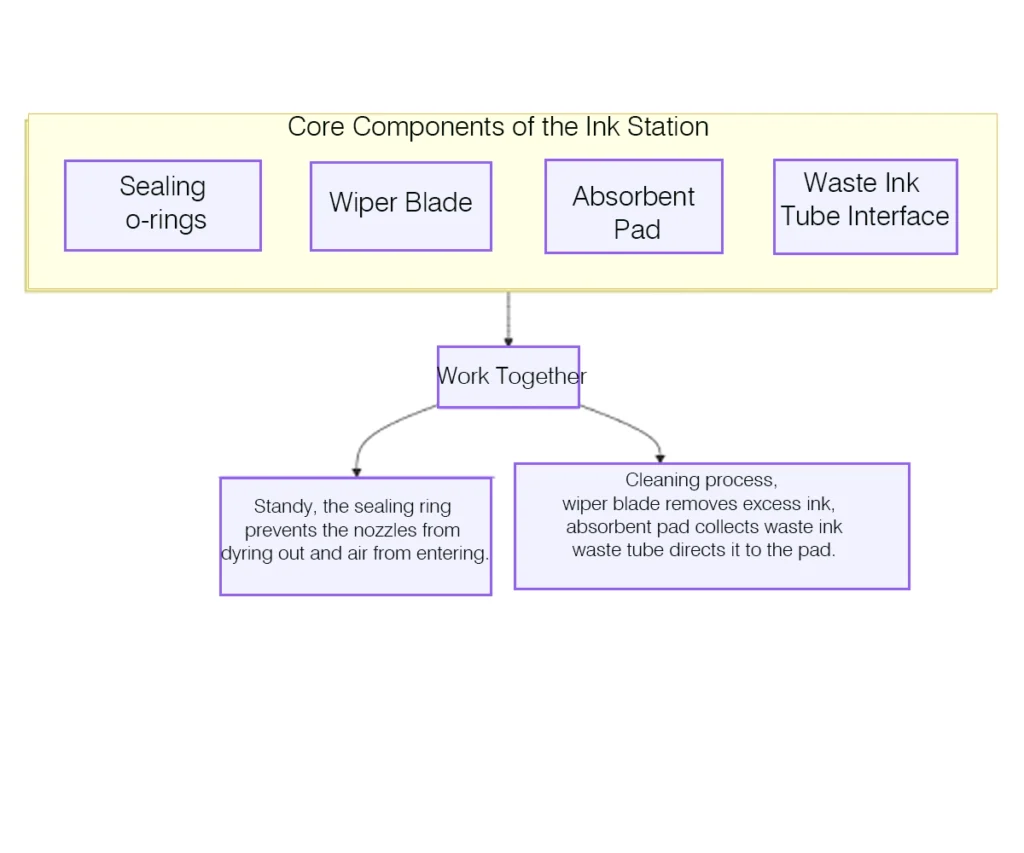
The capping station is not a single part. It includes:
| Component | Function |
|---|---|
| Seal Cap | Seals print head to prevent ink drying |
| Wiper | Cleans ink droplets from head surface |
| Ink Pad | Absorbs waste ink during cleaning |
| Waste Ink Tank | Stores collected waste ink |
Cleaning Method
- Use UV cleaning solution and lint-free wipes.
- Do not use water. Water causes crystallization and electrical risk.
- Check waste ink tank regularly. Empty before full to prevent backflow.
2) Sensor Maintenance — The “Eyes” of the Printer
The 6090 UV printer includes the following:
- Media height sensor
- Encoder strip sensor (grating ruler)
- Home position sensor
Cleaning Method
- Lightly wipe with a lint-free cloth dipped in isopropyl alcohol.
- Do not spray liquids.
- Alcohol removes residue and evaporates quickly without leaving moisture.
4. Cooling System Maintenance: The Lifeline of The UV Lamp
The cooling liquid is essential for UV LED heat control.
Function
- Removes heat generated during curing.
- Prevents overheating and UV lamp decay.
- Offers freeze and corrosion protection for internal tubing.
Maintenance
- Check liquid level monthly (machine powered off and cooled).
- Replace coolant every 1–2 years.
- Always use manufacturer-approved UV cooling liquid.
5. Rare but Important: Core Hardware
Mainboard, motors, and belts are durable and stable components.
If they malfunction, contact professional engineers.
Do not attempt to repair these yourself.
Recommended Maintenance Schedule
| Item | Frequency | Key Action |
|---|---|---|
| Guide rail cleaning and lubrication | Monthly | Apply UV printer grease to prevent ghosting and carriage resistance |
| Sensor cleaning | Monthly or as needed | Use alcohol carefully, not water |
| Capping station cleaning | Monthly or as needed | Use UV cleaning fluid to reduce nozzle clogging |
| Cooling liquid level check | Monthly | Keep the coolant level between the min–max line |
| Cooling liquid replacement | Every 6–12 months | Use manufacturer-specified coolant only |
| Damper / ink pump / pad replacement | Every 6–12 months | Prevent ink break, unstable flow, and clogging issues |
Is this solution suitable for your application?
Suitable for:
- Businesses operating a 6090 UV printer for multi-surface digital printing who want to ensure stable performance, reduce printhead clogging, and extend machine lifespan.
- Production environments where printheads and UV curing systems must run reliably for hard materials such as metal, glass, wood, PVC and acrylic.
- Teams that perform daily or frequent printing jobs and need regular maintenance checks to prevent quality issues or downtime.
Not suitable if:
- You are simply evaluating whether to buy a UV printer and haven’t yet committed to using one—for that, a product evaluation/consultation might be more helpful.
- Your current needs are only for occasional, small hobby projects where maintenance complexity is not a priority.
- You are using very different printer models (e.g., non-UV, small hobby printers) where the maintenance tips here do not apply.
Key factors to evaluate:
- Maintenance frequency & workload: How often does your printer run? Daily production demands need stricter maintenance.
- Operating environment: Ambient temperature, humidity, and dust conditions have a significant impact on printhead health and consistency of UV curing.
- Ink type & consumables: Using stable, manufacturer-recommended UV inks helps avoid clogging and prolongs service life.
- Print quality expectations: If you produce for high-precision markets (e.g., signage, packaging, customized products), regular maintenance is essential.
If you are unsure, we can help evaluate your case
If you’re not certain whether the maintenance practices above suit your 6090 UV printing setup or want to discuss a maintenance plan tailored to your production workflow, our technical team can help evaluate your current condition and recommend the best approach—contact us today for a professional assessment.
Conclusion
With correct maintenance, your UV printer flatbed system will run with:
- Lower failure rate
- Higher stability
- Longer equipment lifespan
- Better return on investment
Consistent care ensures your uv flatbed printing workflow remains efficient and profitable, protecting the long-term value of your 6090 UV printer.
If you are looking for a 600×900mm UV flatbed printer for direct printing, UV DTF crystal labels, and 3D raised label applictions, you can learn more about our 6090 UV printer.
References
DO not use water.Epson industrial printhead guidelines emphasize using dedicated cleaning fluid instead of water to prevent crystallization and nozzle blockage .
[2] Seiko Epson Corporation. Epson Industrial Inkjet Printhead User Guide, 2020.
If you are facing a similar issue in your production, feel free to contact us.
🤖 Ask ChatGPT about this articleFrequently Asked Questions About 6090 UV Printer Maintenance
How often should I maintain a 6090 UV printer?
Daily basic maintenance is recommended, including cleaning the printhead and checking the ink system. Key consumable parts such as dampers, wipers, and capping pads should be replaced every 6–12 months depending on usage.
What causes nozzle clogging in a 6090 UV printer?
Nozzle clogging is usually caused by dried ink, poor cleaning, or worn components like the ink pump and capping station. Using proper cleaning solution and regular maintenance helps prevent this issue.
Can I use water to clean a UV printer?
No, water should never be used to clean a UV flatbed printer. It can cause ink crystallization and damage the printhead. Always use a dedicated UV cleaning solution.
Why is guide rail lubrication important for UV printers?
Proper lubrication ensures smooth carriage movement, reducing vibration, misalignment, and print defects such as ghosting. It also helps extend the lifespan of mechanical components.
How do I know when to replace UV printer consumable parts?
Signs include poor print quality, incomplete cleaning, ink leakage, or unstable printing. Regular replacement every 6–12 months helps prevent most common printing issues.
How can I extend the lifespan of a 6090 UV printer?
Regular maintenance, proper cleaning, stable working environment, and using recommended inks and parts can significantly extend the lifespan and ensure consistent printing performance.