
In industrial UV flatbed printing machine systems, the negative pressure system is critical. It controls ink stability and protects the printhead.
For industrial models and large-format production, it is not optional. It is standard.
This guide explains:
- What negative pressure ink supply is
- How the system works
- Core functions
- Common problems and troubleshooting
- Which printers must use it
- Electronic vs siphon negative pressure
- Epson i3200 recommendations for 6090 flatbed UV printer
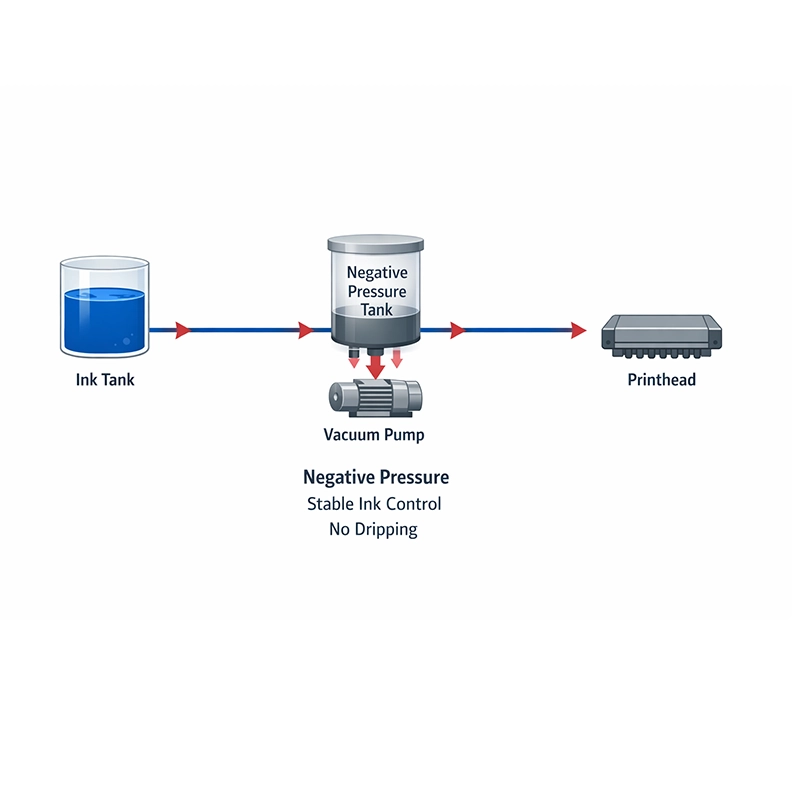
What Is Negative Pressure Ink Supply?
Negative pressure ink supply uses vacuum force to control ink flow.
A pump creates a stable vacuum between the ink tank and the printhead. This keeps ink balanced. It prevents dripping. It prevents overpressure.
Simple explanation:
👉 The system keeps ink in a stable and controlled state.
In any professional UV flatbed ink printer, ink balance directly affects print quality.
How the Negative Pressure System Works
A complete system includes:
- Negative pressure tank
- Vacuum pump
- Pressure controller
- Sensor
- Solenoid valve
- Ink tubing system
Working Process
1. Vacuum Balances Gravity
The pump creates negative pressure. This offsets ink weight. It prevents ink dripping from the nozzle.
2. Automatic Ink Refill
During high-speed printing, vacuum level changes. The system automatically compensates to keep the ink supply stable.
3. Real-Time Pressure Adjustment
Sensors monitor pressure. Precision can reach 0.1 kPa.
Valves respond quickly to match different print speeds.
This is especially important for a large-format UV flatbed printer running long production cycles.
Core Functions of a Negative Pressure System
1. Prevent Ink Dripping
- Pressure too low → Ink leaks
- Pressure too high → Missing lines or no ink output
Correct pressure ensures stable printing.
2. Maintain Stable Ink Supply
UV printers fire thousands of droplets per second.
The system ensures:
- No banding
- No color loss
- Consistent output
For industrial users concerned about uv flatbed printer price, stability means lower maintenance costs over time.
3. Protect the Printhead
Unstable ink flow can cause:
- Ink drying
- Air entering the head
- Piezo damage
The negative pressure system protects your investment.
Common Negative Pressure Problems
1. Pressure Too High
Symptoms:
- Dry printing
- Missing lines
- Air marks
Causes:
- Aging vacuum pump
- Overadjusted pressure
2. Pressure Too Low (Most Common)
Symptoms:
- Continuous ink dripping
- Ink drops on the platform
- Leakage during idle time
When pressure approaches normal atmospheric level, ink flows out naturally.
3. Frequent Pressure Fluctuation
Symptoms:
- Uneven color density
- Unstable printing
Causes:
- Pump aging
- Air leakage in tubing
- Low ink level drawing air
Older UV flatbed printing machine models show this issue more often.
How to Troubleshoot the System
Check Pressure Range
Common range:
- -20 KPa to -50 KPa
- One Pass machines: around -42 KPa
- Some systems: around -30 KPa
Compare with factory settings.
Check Airtightness
Method:
- Turn off the vacuum pump
- Monitor pressure drop
Standard:
- Pressure drop ≤5 KPa in 10 minutes = normal
- Rapid drop = air leakage
Exclude Printhead Damage
If banding appears:
- Clean the printhead
- If recovered → likely pressure issue
- If not, internal head damage
Which UV Printers Must Use Negative Pressure?
Industrial printheads require it, including:
- Ricoh G5
- Ricoh G6
- Kyocera heads
These heads do not use damper ink bag systems. They depend on negative pressure.
Any large-format UV flatbed printer using these heads must include this system.
Does a 6090 UV Flatbed Printer Need Negative Pressure?
Common small machines:
- 6090 flatbed UV printer
- A3 UV printer
- A4 UV printer
- Small roll UV printer
These machines usually use damper-based ink supply.
For Small Models:
- Short ink path
- Lower speed
- Cost-focused design
👉 Negative pressure is not mandatory.
This helps keep the 6090 UV flatbed printer affordable and competitive.
Epson i3200: Small vs Industrial Configuration
Small UV Printer (1–4 i3200 Heads)
Examples:
- 6090 flatbed UV printer
- Entry-level production machines
Normally:
- Built-in damper system
- No negative pressure required
Adding negative pressure will:
- Increase cost
- Increase system complexity
- Raise maintenance cost
For cost-sensitive buyers comparing UV flatbed printer prices, this matters.
Industrial Machine (More Than 4 i3200 Heads)
If the printer uses:
- 4+ Epson i3200 heads
- High-speed white ink printing
- Long continuous production
Then negative pressure becomes a smart option.
Benefits:
- More stable ink supply
- Less banding
- Longer head life
- Better reliability
This setup is common in upgraded industrial machines.
Electronic vs Siphon Negative Pressure
Electronic Negative Pressure (Mainstream)
Features:
- Sensor controlled
- Solenoid valve adjustment
- High precision
- Suitable for high-speed machines
Most industrial uv flatbed ink printer systems use this design.
Siphon Negative Pressure (Early Method)
Principle:
- Uses liquid level difference to create vacuum
Features:
- Simple structure
- Lower stability
- Not suitable for high-speed printing
Still used in some One Pass systems.
Buying Advice
Buying a New Printer
Professional manufacturers match pressure parameters before delivery. No extra adjustment needed.
If you are evaluating brands such as the Besjet UV flatbed printer or other suppliers, ask about:
- Pressure range
- Pump quality
- Airtightness testing
Buying a Used Printer
Check carefully:
- Vacuum pump condition
- Air leakage
- Pressure fluctuation
The vacuum pump is a consumable part. Old machines often show instability.
Final Conclusion
The negative pressure system affects:
- Print stability
- Color consistency
- Printhead lifespan
- Maintenance cost
For industrial production, it is essential.
For small 6090 UV flatbed printer models, it is optional and depends on positioning.
In simple terms:
Small machine → Cost priority
Industrial machine → Stability priority
Understanding this system helps you make a smarter decision when comparing UV flatbed printer prices and machine configurations.
If you are selecting a new UV flatbed printing machine, always match the ink supply system to your production level.