
Three Core Factors to Consider When Selecting a UV Printing
When purchasing a uv 3d printer, many users are most concerned not about price, but about one question:
Is this uv 3d printing stable?
Stability directly determines:
Whether print accuracy remains consistent.
Whether the equipment has a high failure rate.
The cost of long-term maintenance.
Whether it is suitable for long-term batch production.
This article draws from practical production experience to help you determine whether a UV DTF printer for stickers is truly stable and worth long-term use. We will focus on its three core components—the mainboard, printhead, and motor—while also considering the temperature and humidity requirements of the UV printing service environment.
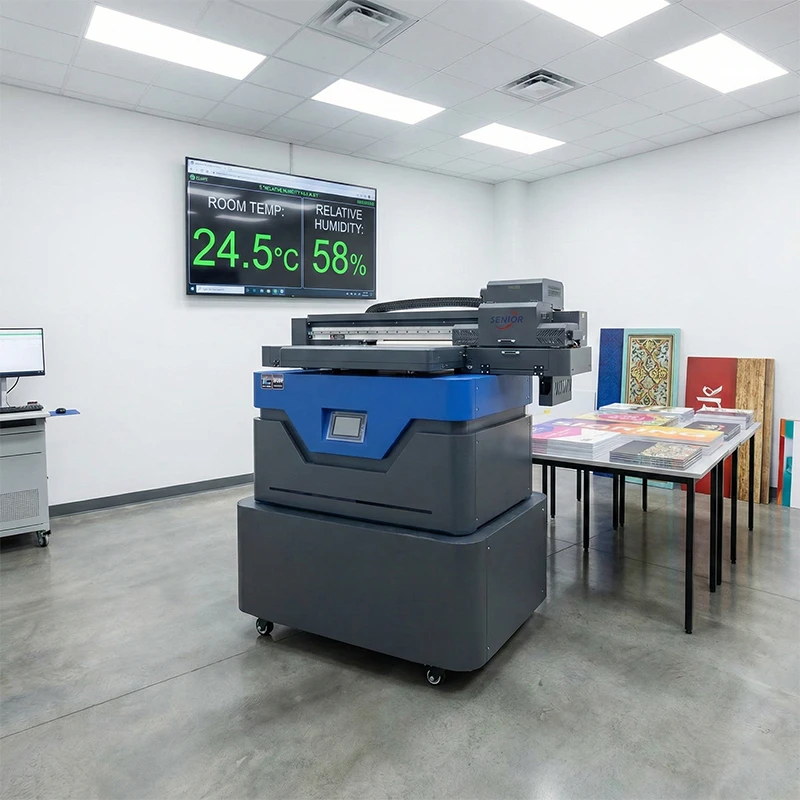
When selecting a uv printer machine, first examine the three core configurations that determine stability
The stability of a UV Print machine is not determined by its appearance or how impressive its spec sheet looks, but rather by the combined performance of these three critical components:
Mainboard (Control System)
Printhead (Printing Core)
Motor (Motion System)
If any one of these components is unstable, the entire UV printer machine will experience frequent issues during actual production.
Mainboard aren’t necessarily better just because they’re self-developed; stability is the key factor
Many manufacturers emphasize that
“the mainboard is independently developed by the manufacturer.”
when introducing uv machine for printing.
However, in actual use, this does not necessarily guarantee greater stability.
UV machine for printing are fundamentally assembled from mature industrial components, and the mainboard constitutes a highly specialized industrial control system. Truly stable mainboard typically originate from professional mainboard manufacturers and have undergone long-term market validation.
Mainstream, stable Printer DTF UV typically feature the following characteristics:
Utilize mature, proven mainboard systems
- Stable software with high compatibility
- Easier maintenance and upgrades
If a manufacturer claims the mainboard is entirely “self-developed,” prioritize verifying:
- Whether it has undergone long-term market validation
- Whether the control system is mature and stable
- Whether after-sales maintenance is guaranteed
When selecting a mainboard, prioritize stability and validation results over the “self-developed” label.
Printhead: Determines small uv dtf printer Precision and Finished Product Quality
The printhead is the core output component of a UV DTF printer, directly impacting:
Printing precision
Color consistency
Long-term operational stability
Common uv printer near me Printhead Types
Epson printheads
Ricoh printheads
Mainstream Printheads and Core Parameters (by Brand)
- Ricoh (Industrial Mainstay)
G5/G5i: Classic model with minimum droplet size approx. 7 pl, 1280 nozzles, 8-level grayscale, metal nozzles resistant to UV ink for extended lifespan; compatible with medium-to-large UV flatbed/roll-to-roll printers, ideal for advertising/signage/packaging.
G6/G7: Upgraded from G5, ignition frequency increased to 50 kHz, speed boosted by ~30%, droplets 7-21 pl, balancing high speed and precision, suitable for high-volume industrial production.
GH220: Entry-level industrial grade, affordable pricing, compatible with small UV flatbeds (e.g., 6090), ideal for small-batch customization.
- Epson (High Precision Preferred)
I3200-A1/U1: PrecisionCore technology, 3.5-10 pl ink droplets, 3200 nozzles, 1440 dpi, smooth color transitions; compatible with DTG/DTF/crystal labels/UV transfers, suitable for high-precision modes like 8-pass.
S3200-U3: 4-inch wide format, 3200 nozzles, VSDT variable droplet technology, balances high speed and precision, compatible with wide-format UV roll media/flatbeds.
XP600: Entry-level, high cost-performance ratio, suitable for small UV photo/signage applications, precision and durability slightly inferior to the I3200 series.
- Konica (High-Speed, High-Ink Volume)
- KM1024 Series (1024i/1024a): Large ink droplets (up to 42pl), high firing frequency, ideal for outdoor advertising/roll-to-roll printers, featuring ample ink volume and high speed.
- Kyocera (Industrial Durability)
- KJ4A/KJ4B: Piezoelectric technology with high firing frequency and exceptional durability. Designed for high-speed UV roll-to-roll and industrial packaging applications, delivering stable output for large-volume production.
Different printheads have distinct characteristics in terms of precision, speed, lifespan, and cost. However, regardless of the printhead selected, the most critical factor is whether the entire system is properly matched.
A printhead does not operate in isolation; it must integrate with:
The mainboard system
Motor control
The ink system
to form a stable, coordinated whole.
Servo Motors vs Stepper Motors: Why Do High-End uv print machine Choose Servo Motors?
In uv print machine, the motor determines the overall motion precision and stability of the entire device.
The two most common configurations
Servo Motors
Stepper Motors
Characteristics of Stepper Motors
Lower cost
Relatively simple structure
However, the drawbacks are also evident:
Cannot operate at excessively high speeds
Prone to vibration during high-speed operation
Significant precision degradation after prolonged use
Relatively short service life
During led uv printer, vibration directly causes image ghosting, misalignment, and unstable precision.
Advantages of Servo Motors
Smooth operation with minimal vibration
Maintains high precision even at high speeds
Longer service life
Suitable for extended continuous production
Consequently, most stable rotary uv printer prioritize servo motors.
Note: Some manufacturers substitute servo motors with stepper motors to reduce quotes. While initially cheaper, this approach significantly increases long-term stability risks and maintenance costs.
Environmental Temperature and Humidity Requirements for A4 UV Printer
Many users overlook a critical factor when operating A4 UV Printer:
the temperature and humidity of the printing environment.
Especially after entering winter, as temperatures drop, inadequate environmental control can easily lead to the following issues:
Ink pooling and spreading
Misaligned bidirectional print lines
Pattern misalignment and ghosting
Reduced uv dtf printer for sale stability
Recommended cheap uv printer Environmental Parameters
To ensure long-term stable operation of cheap uv printer, we recommend:
Indoor temperature: 20–25°C
Ambient humidity: 55%–65%
Within this temperature and humidity range:
Ink flow remains more stable
Printhead performance stays more consistent
Bidirectional printing is easier to calibrate
Personal uv printer achieves higher precision and consistency
Why do temperature and humidity affect uv flatbed printer news results?
Low temperatures increase ink viscosity, leading to ink breakage and splattering.
Low humidity increases static electricity, causing ink dispersion.
Unstable environments amplify mechanical inaccuracies inherent in UV printer machines.
Even a high-end UV print machine will suffer significantly reduced print stability if the environment is unsuitable.
The True Standard of uv machine Stability: Long-Term Accuracy and System Reliability
The stability of a UV machine is not merely determined by whether it malfunctions, but by its overall performance during long-term use:
Whether print accuracy remains consistent over time
Whether component maintenance intervals are sufficiently extended
Adaptability to environmental changes
Wear and tear on mechanical structures and guide rails
Fewer repairs and lower adjustment frequency indicate superior overall equipment stability.
A stable uv flatbed printing machine requires both core configuration and optimal operating environment
A truly stable UV flatbed printing machine requires all of the following:
A mature and reliable motherboard system
A well-matched printhead solution
A motion structure prioritizing servo motors
Appropriate and controllable ambient temperature and humidity during printing
Equipment configuration sets the baseline, while the operating environment determines the upper limit.
If you have questions about UV print machine selection, configuration comparisons, environment setup, or print parameters, feel free to contact us. Our technical team will provide you with professional, actionable UV machine solutions.