
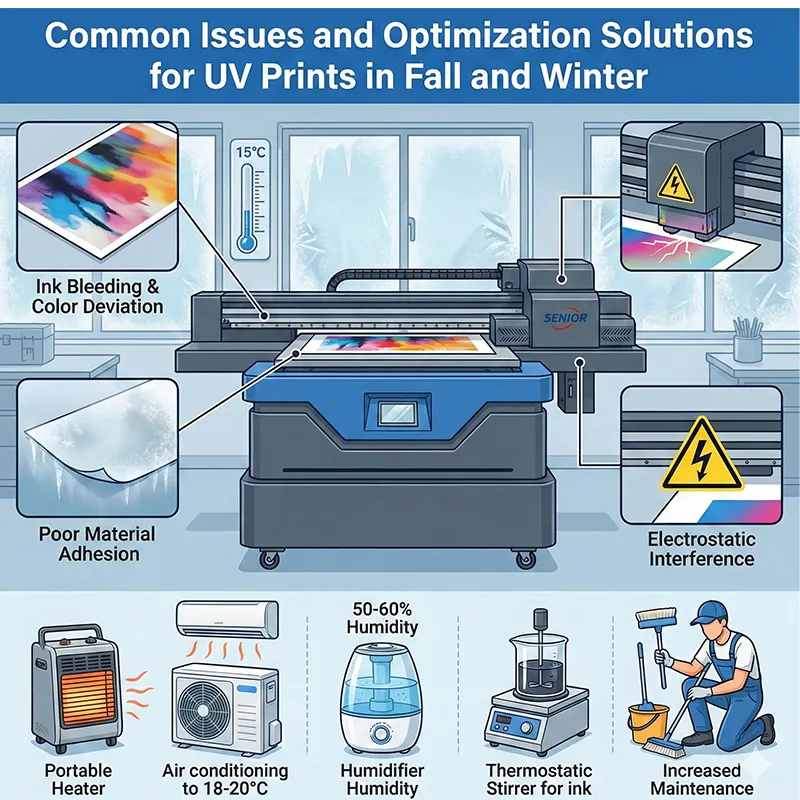
As the weather gradually turns colder, production workshops using UV prints during autumn and winter often encounter specific issues such as ink bleeding, color bleeding, and color deviation.
Often, printhead tests show normal results, yet actual print quality remains unsatisfactory. This does not necessarily indicate equipment malfunction but is influenced by environmental temperature, humidity, and ink condition. This article systematically analyzes common UV prints problems in autumn and winter and provides optimization solutions.
Low ambient temperatures reduce ink flowability
Issue
Minor nozzle clogging, stringing, and ink splatter occur during uv digital printer.
Ink flow is restricted, resulting in unstable print quality.
Cause Analysis
When workshop temperatures drop below 18°C during autumn and winter, UV ink viscosity increases. This reduces ink flow from the printhead, causing flat UV printer abnormalities.
Solution
Before starting the cheapest uv printer, preheat the workshop using air conditioning to raise the temperature above 18–20°C.
Maintain a stable temperature throughout the production environment to minimize the impact of temperature fluctuations on ink performance.
Affordable uv printer Ink Viscosity Changes Cause Color Deviation and Ink Breakage
Issue
UV printer for sale color deviation
Ink breakage and ink drifting occur during printing
Cause Analysis
In low-temperature environments, home UV printer ink becomes thicker, resembling syrup, and its flowability decreases, leading to an uneven ink supply to the printhead.
Solution
Use a thermostatic stirrer to maintain stable ink temperature and viscosity.
Test ink viscosity before used uv printer to ensure uniform ink flow.
Heat ink appropriately when necessary to improve fluidity.
6090 uv printer Material Adhesion Decreases Due to Low Temperature
Issue
Poor adhesion of 6090 UV printer ink
Surface prone to ink splatter and peeling
Cause Analysis
Sheets, glass, or other materials brought directly from the warehouse to the large uv printer workshop carry cold air on their surfaces, resulting in poor ink adhesion.
Solution
Place materials in a warm, air-conditioned workshop in advance to allow their temperature to match the workshop environment.
Ensure material surfaces are dry and at an appropriate temperature before proceeding with the UV printer for small business.
Used uv printer Workshop Air Dryness Causes Electrostatic Interference
Issue
Used UV Printer Ink Splatter
Unstable Print Quality
Cause Analysis
During autumn and winter, dry air causes static electricity to accumulate, interfering with inkjet nozzles and affecting UV sticker printer quality.
Solutions
Humidity in the uv printed pins workshop is maintained between 50% and 60%.
Humidifiers and static eliminators are used to ensure environmental humidity and static safety.
Temperature and humidity are measured regularly to maintain a stable workshop environment.
Insufficient UV DTF Sticker Printer Maintenance Frequency
Issue
Nozzle clogging or uneven ink flow
Unstable UV DTF Sticker Printer results
Cause Analysis
Winter reduces ink fluidity, requiring more frequent machine maintenance.
Solutions
Increase nozzle cleaning and maintenance frequency
Perform standard cleaning procedures daily before closing
Regularly inspect ink pathways and nozzles to ensure smooth ink flow
Low Temperature Impact on Ink Curing in uv dtf custom printing Workshop
Issue
Incomplete ink curing, prone to scratching
Unstable rotary uv printer speed and precision
Cause Analysis
In low-temperature environments, UV ink curing speed decreases, affecting print uv 2025 results.
Solution
Increase UV lamp power
Appropriately reduce printing speed
Ensure complete ink curing to improve uv sticker printer quality
Summary and Recommendations
Most issues with the UV prints during autumn and winter are not caused by equipment malfunctions but rather by environmental factors and daily operational practices.
The following measures can significantly improve printing stability and quality:
- Maintain workshop temperature above 18–20°C
- Keep workshop humidity at 50%–60%
- Use a thermostatic stirrer to maintain ink fluidity
- Pre-adjust material temperature
- Increase printhead cleaning and machine maintenance frequency
- Adjust UV lamp power and print speed to ensure ink curing
By mastering these methods, you can reliably operate the UV prints during autumn and winter, achieving high-quality, high-efficiency printing production.