
How to Choose Between 1 Pass, 4 Pass, 6 Pass, and 8 Pass?
When using UV the printer for production, many users encounter a parameter: the number of passes (printing channels).
So what exactly does the Pass setting on a 3D printing UV light mean? What are the differences between various Pass settings? And how should you select the appropriate Pass mode based on your product?
This article systematically explains the meaning, principles, advantages, disadvantages, and suitable applications of 1 Pass / 4 Pass / 6 Pass / 8 Pass, helping you make more informed choices in actual production.
What is a pass in UV LED printing?
Pass data refers to the number of times the print head repeats printing on the same area during the UV printer news today process of a product pattern.
Simply put:
The product needs to “pass through” the print head a certain number of times to complete the entire pattern.
Lower pass count → Fewer print passes, faster speed.
Higher pass count → More print passes, higher precision, richer color detail.
Therefore, the pass count directly impacts:
Print speed.
Print precision.
Color saturation.
Suitable product types.
Per-item UV LED printing cost.
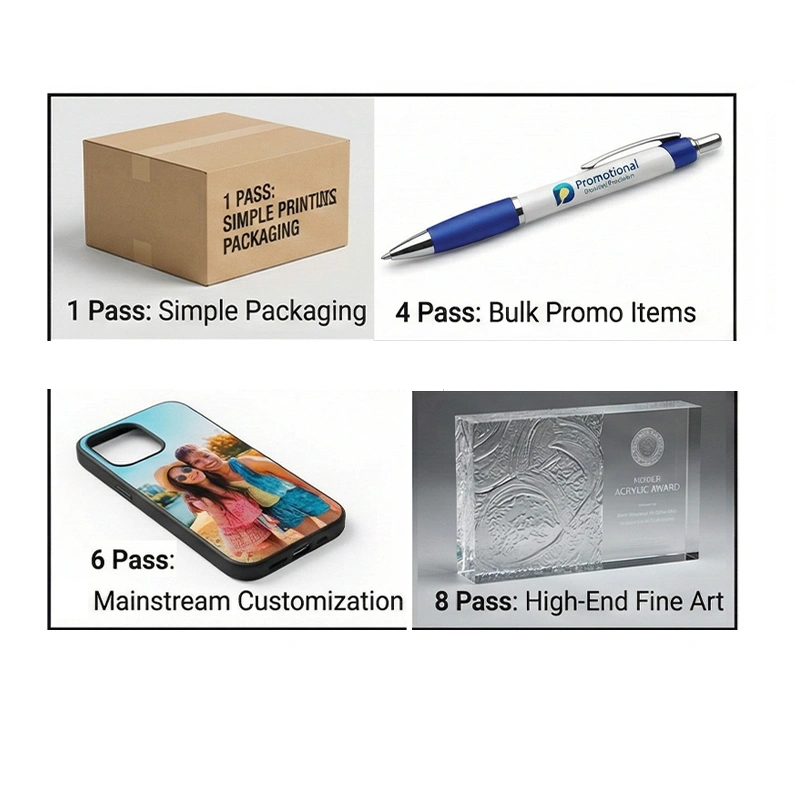
What is 1 Pass (One Pass) in UV printing equipment?
What is 1 pass?
In UV printing equipment, 1 Pass (One Pass) refers to:
Completing the entire pattern in a single pass as the product moves under the printhead.
Advantages
Extremely fast printing speed.
Ideal for high-volume, low-precision production.
Highest efficiency for single-item production.
Disadvantages
Relatively coarse ink droplets.
Limited color gradation.
Challenging color matching and control.
High demands on printhead consistency and machine stability.
Suitable Applications
Products with low precision requirements.
Simple patterns, solid colors, or text printing.
High-efficiency, low-cost orders.
Core Definitions
- 1pass (Single Pass): UV resin for 3d printing area is scanned or covered only once by the printhead; Single Pass emphasizes the “fixed printhead, moving substrate” imaging architecture.
- Pass Count: Number of times the printhead covers a unit area; higher pass counts result in denser coverage, better color, and more detail, but slower speed.
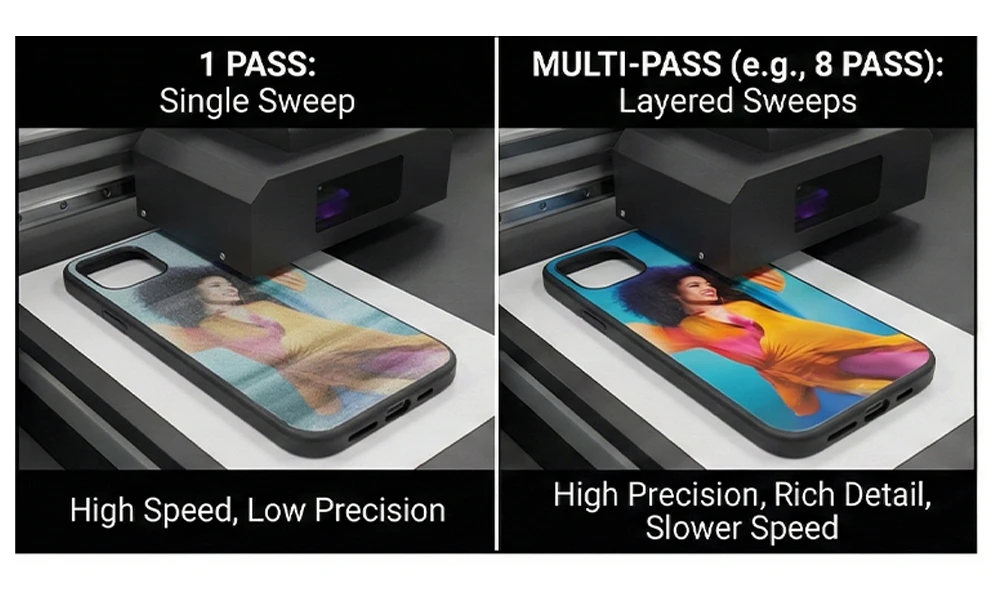
What is 4-Pass a3 uv flatbed printer
The Principle of 4-Pass a3 uv flatbed printer
4-Pass printing divides the entire print area into four sections, applying UV ink in multiple sequential passes.
Example:
The UV the printer area is divided into ①②③④.
When the printhead prints area ②, area ① undergoes a reprint.
When printing area ③, areas ①② undergo a reprint.
When printing area ④, areas ①, ②, and ③ undergo overprinting.
This multi-pass layering achieves more uniform ink droplet distribution.
Advantages
Desktop uv flatbed printer offers high speed
Significantly improved precision compared to 1-pass printing
High cost-effectiveness and production efficiency
Disadvantages
Limited precision and color reproduction.
Not suitable for ultra-fine, high-end patterns.
Suitable Scenarios.
Products with low precision requirements.
Price-sensitive orders.
High-volume, fast-turnaround production.
Specific Process for 4 pass
The china uv roll to roll printer substrate moves at a constant speed while the printhead completes the first inkjet pass along a preset path, applying a base ink layer.
The printhead then returns or the substrate moves in coordination to perform a second inkjet pass over the same area, filling gaps in the initial ink layer.
This process repeats for the third and fourth inkjet passes. The final image is formed by stacking these four ink layers.
Compared to 1-pass printing, 4-pass printing reduces banding and enhances color transition smoothness by increasing coverage passes. However, it demands higher precision in printhead control and greater stability in media feeding.
6-Pass uv printing news Mode (Most Commonly Used)
Why is 6-Pass the mainstream choice?
6 Pass is currently the most frequently used mode in daily uv printing news production, achieving an ideal balance between speed and precision.
Advantages
Color reproduction remains consistent.
Ink dots are fine and layered with clarity.
Direct phone case UV printer balances speed and quality.
Ideal for continuous high-volume production.
Suitable Scenarios
Most standard orders in the market.
Commercial customization and branded products.
Clients demanding both quality and efficiency.
If you’re unsure which pass to choose, 6 Pass is a safe bet.
Core Features of 6-Pass Printing
- Imaging Advantages: Compared to 1-pass/4-pass printing, 6-pass effectively reduces nozzle banding and minimizes ink droplet granularity. It delivers more natural color saturation and gradient transitions, achieving stable UV printing services near me resolutions of 1440 dpi and above. Ideal for high-end customization and intricate pattern output.
- Speed and Cost: Due to increased ink passes, 3D printing UV light speed is noticeably slower than lower-pass modes, with slightly higher ink consumption. This makes it more suitable for small-batch, high-demand orders—such as intricate embroidery-like heat transfers, three-dimensional edges on crystal labels, and complex patterns for premium apparel printing.
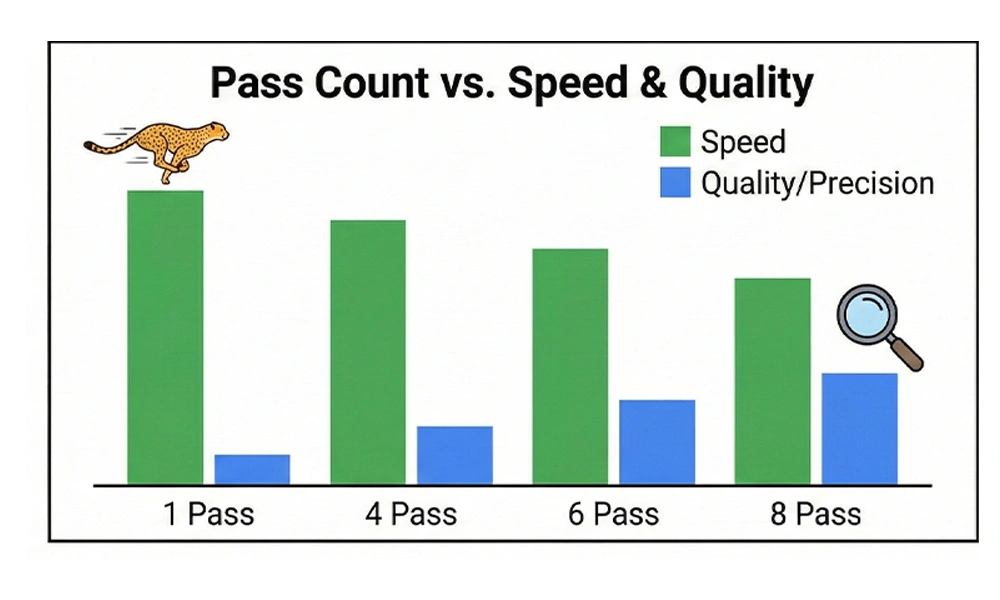
What is 8-Pass uv printer machine Mode? (High Precision)
Features of 8-Pass
The principle of the 8-pass UV Printer machine is similar to 4-pass, but the same pattern is printed 8 times. This results in shorter step distances and more thorough ink layering.
Advantages
Extremely high printing precision.
Smooth, rich color transitions.
Excellent detail reproduction.
Disadvantages
Slower printing speed.
Higher per-unit cost.
Applications
High-precision custom products.
Premium crafts, intricate imagery.
Clients demanding exceptional image quality.
Core Features
Imaging Precision: Maximizes elimination of printhead banding and softens ink droplet edges. UV printing news resolution easily achieves 1440dpi and above. Color reproduction and detail rendering represent the pinnacle of low-pass modes, ideal for scenarios demanding ultimate image quality.
Speed and Cost: 3D Printing UV light operates at the slowest speed among all pass modes and consumes relatively more ink. It is suitable only for small-batch, high-end custom orders and is not recommended for large-scale mass production.
UV printer machine Requirements: Must be paired with high-performance grayscale piezoelectric printheads (e.g., Epson I3200-E1, Ricoh G6/G7), and demands exceptional precision in substrate feeding, ink supply system stability, and color management capabilities of RIP software. Failure to meet these standards may result in ghosting, color deviation, and uneven ink layer accumulation.
Typical Application Scenarios
Textile Printing: Reproducing intricate embroidery patterns, complex gradient designs for premium streetwear brands, and customized small-area logo heat transfers.
Signage & Craftsmanship: Creating three-dimensional glossy edges for direct phone case UV printer crystal labels, ultra-fine graphics on metal/acrylic signs, and simulated foil stamping effects for gift packaging.
Advertising & Fine Art: High-end art micro-printing, gradient transitions in lightbox posters, and museum-grade reproduction images.
How to Choose Different A3 UV Flatbed Printer Passes?
In actual production, there is no “absolute best” pass mode—only the “most suitable” one.
You need to comprehensively consider the following factors:
Product material and surface requirements.
Customer expectations for precision and color accuracy.
Order quantity and delivery timeline.
Product unit price and profit margin.
| Pass | UV Printing Speed | Accuracy | Recommended Uses |
| 1 Pass | ★★★★★ | ★ | Ultra-high speed, low precision |
| 4 Pass | ★★★★☆ | ★★☆ | Low-cost bulk orders |
| 6 Pass | ★★★☆☆ | ★★★★ | Mainstream commercial production |
| 8 Pass | ★★☆☆☆ | ★★★★★ | High-end customization |
How Pass Selection Affects UV Printing Quality, Efficiency and Cost
The selection of pass counts directly impacts your production efficiency, product quality, and customer satisfaction.
Only by using pass modes appropriately can you achieve the optimal balance between speed, quality, and cost.
If you’re facing challenges in:
UV printer machine Configuration Selection
Print Parameter Settings
Ink and Consumable Compatibility
UV printing equipment Solutions for Different Materials
If you encounter any difficulties in these areas, feel free to contact us. Our professional technical team will provide you with one-on-one UV printer solutions.