

Many small UV printing workshop owners and operators face the same frustrating issue:
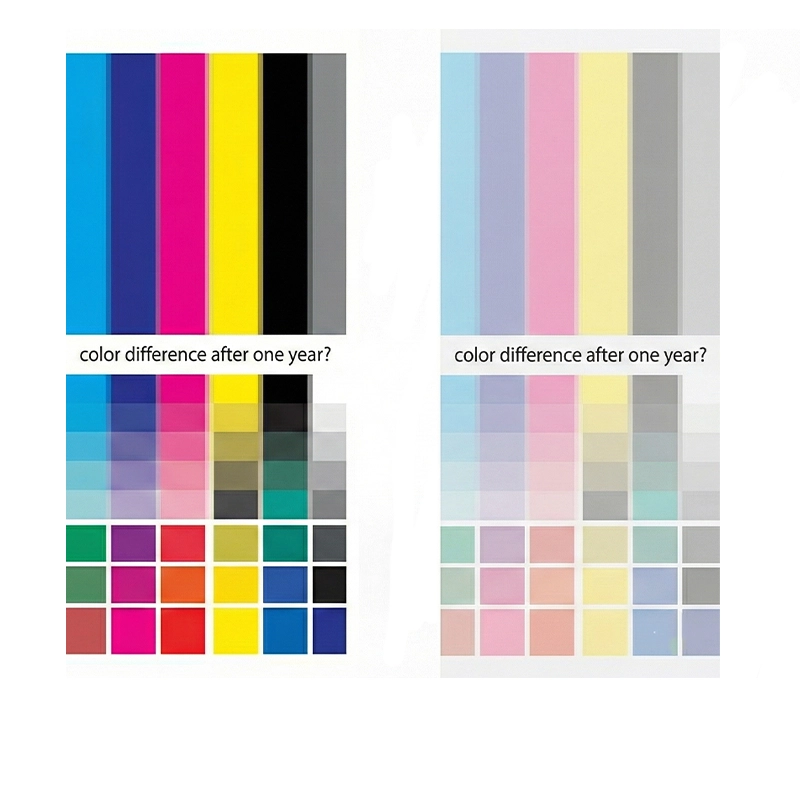
The same UV printer, the same ink, the same ICC profile, and the same material—yet the color printed this year looks noticeably different from last year.
Customers compare samples and complain about color variation. Repeat orders become difficult. Production stability feels uncertain.
So why does this happen?
Let’s systematically analyze the real causes of UV printer color difference over time.
What Is UV Printer Color Difference?
UV printer color difference refers to visible changes in printed color output under seemingly identical production conditions.
Common symptoms include:
- UV print color not the same as previous orders
- UV printer color shift over time
- Slightly darker or lighter tones
- The new printhead prints darker
- Inconsistent batch production
This issue is especially critical for OEM factories and custom printing businesses that require long-term color stability.
1. UV Printer Temperature Influence
One of the most overlooked factors is environmental temperature.
UV ink has a specific viscosity range. The UV ink viscosity effect on color is significant:
- High temperature → lower viscosity → higher ink flow → darker color
- Low temperature → higher viscosity → reduced ink flow → lighter color
If your workshop temperature fluctuates between seasons, UV printing color variation becomes inevitable.
Recommended Control:
- Maintain 20–28°C stable temperature
- Control humidity consistently
- Record environmental data for critical orders
Without environmental control, color stability cannot be guaranteed.
2. UV Printer Printhead Aging Effect
Printheads are consumable components.
Over one or two years, subtle mechanical wear occurs:
- Nozzle diameter changes
- Slight misfiring
- Reduced ink output consistency
- Increased deflection
Even if test patterns look “normal,” actual droplet volume may have changed.
This leads to gradual UV printer color shift.
A common phenomenon:
A new printhead prints deeper and richer colors.
An old printhead produces slightly lighter or uneven tones.
The difference becomes visible when comparing year-old samples.
3. UV Printer Color Calibration Changes
Even when using the same ICC profile, calibration conditions may have changed.
Possible causes:
- RIP software updates
- Parameter reset after maintenance
- Motherboard replacement
- Voltage adjustments
UV printer color calibration should always be redone after:
- Hardware repairs
- Software updates
- Printhead replacement
Small voltage changes directly affect droplet size and color density.
4. UV Ink Batch Variation
Even within the same brand, batch variation can occur.
Reasons include:
- Raw material adjustment
- Formula optimization
- Long storage time
- Improper storage conditions
Pigment sedimentation can also impact output density.
Best practice:
- Record ink batch numbers
- Test new batches before production
- Shake ink thoroughly before use
5. Printing Mode & Pass Changes
Different printing modes influence color density.
Examples:
- 4 Pass vs 8 Pass
- Feathering algorithm differences
- Resolution changes
Operators sometimes adjust speed for efficiency, unintentionally affecting color output.
Standardization is critical.
Why Do UV Printer Colors Change Over Time?
The key reason is accumulation.
Over one year:
- Temperature varies
- Ink batches change
- Printhead ages
- Voltage shifts
- Software updates
Individually, each change is small.
Together, they create visible UV printer color mismatch.
UV printing is a system, not a static machine.
UV Printer Color Mismatch Troubleshooting Checklist
If you experience UV printer color difference, check:
- Workshop temperature & humidity
- Ink batch number
- Printhead usage hours
- Voltage parameters
- Printing mode consistency
- Software update history
Systematic troubleshooting is more effective than random adjustments.
How to Keep UV Printer Color Stable?
For UV6090 users and small-format UV printers, long-term color stability requires process management.
1. Keep Color Samples
Maintain a standard sample library.
2. Record Production Parameters
Track:
- Temperature
- Humidity
- Ink batch
- Print mode
- Voltage
- Printhead lifespan
3. Reconfirm Color Before Large Orders
Never assume previous settings remain identical.
4. Recalibrate After Hardware Changes
Always recalibrate ICC after printhead replacement.
Conclusion
UV printer color difference after one year is not accidental.
It is the result of:
- Environmental changes
- Printhead aging
- Ink batch variation
- Calibration shifts
- Parameter adjustments
For businesses that rely on stable output, standardized management is essential.
With proper control and documentation, UV printing color stability is absolutely achievable.
FAQ
Why does a UV printer print different colors after one year?
Because environmental changes, ink batch variation, printhead aging, and calibration shifts accumulate over time.
Why do UV printers have the same ICC but different colors?
Even with the same ICC, changes in temperature, voltage, or hardware can affect droplet size and color density.
Does the new printhead print darker?
Yes. A new printhead often produces stronger and more consistent ink output compared to aged printheads.
How to keep UV printer color stable?
Maintain stable temperature, record production parameters, recalibrate after hardware changes, and test new ink batches.
What causes the UV ink viscosity effect on color?
Temperature affects ink viscosity. Higher temperatures reduce viscosity, increasing ink flow and deepening color.